
PayPal referral codes
A PayPal referral code connects your new account to the user who shared it and unlocks the sign-up rewards: $10 in PayPal Rewards points. Pick a code shared by the community below.

We both get $10 when you sign up and spend $5 in 30 days. Tap to join PayPal.

We can both earn a $10 reward when you accept my invite to PayPal and spend $5 within 30 days. Thanks everyone.

We can both earn a $10 reward when you accept my invite to PayPal and spend $5 within 30 days. Use my link.

We can both earn a $10 reward when you accept my invite to PayPal and spend $5 within 30 days. Use my link.
PayPal referral codes (7)
Codes shared by PayPal users. Copy one and enter it when you sign up.
We both get $10 when you sign up and spend $5 in 30 days. Tap to join PayPal.
We can both earn a $10 reward when you accept my invite to PayPal and spend $5 within 30 days. Thanks everyone.
We can both earn a $10 reward when you accept my invite to PayPal and spend $5 within 30 days. Use my link.
We can both earn a $10 reward when you accept my invite to PayPal and spend $5 within 30 days. Use my link.
We can both earn a $10 reward when you accept my invite to PayPal and spend $5 within 30 days. Use my link.

Get a $10 bonus with PayPal, sign up through my referral add your bank/card and make a purchase of $5 or more to qualify.

Join PayPal. Spend $5 with your PayPal. And we both get $10 free. Tap to join PayPal.
Sorted by how many times each code has been copied.
Quick answer: The popular PayPal referral code is "1eS8Fz". You can also use any of the other codes shared by users below: 2KvTBXlhu1M, 2EfwyV, 7OlPH1G5a3U, 1CQ6UW, 1VRw2J, or 1hpmVe. Eligible new users can receive $10 in PayPal Rewards points after they complete the required qualifying steps. Enter a code on the PayPal sign-up screen when you create your account.
What is PayPal?
PayPal is a digital payments service for online purchases, money transfers, and seller payments. You can use PayPal to pay on websites and apps, send money to friends and family, keep a balance, request money, and accept payments as a seller. You may get buyer purchase protection on eligible Goods and Services payments.
You can create a personal or business account with your email, phone number, and identity details. You can add a bank account, debit card, or credit card to fund payments and move money. PayPal also gives Rewards points for qualifying activity, which you can redeem in PayPal. Your country and account verification can affect available features, payment types, and protection rules.

Why sign up with a PayPal referral code
How the referral works
The code runs through PayPal's own referral program.
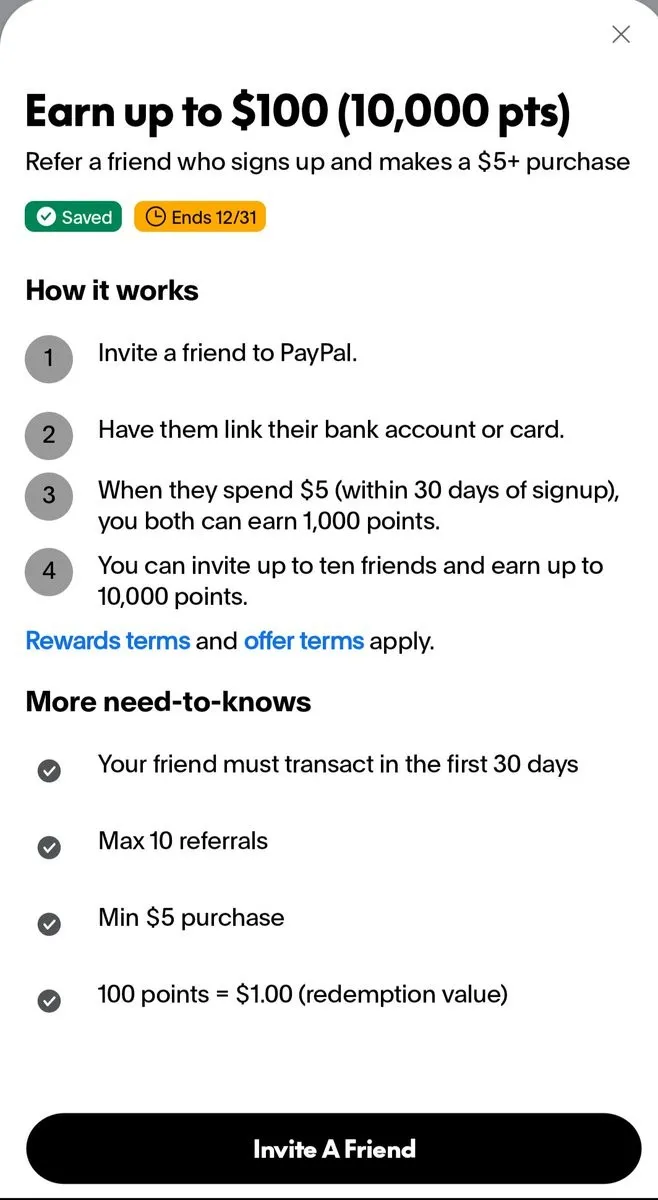
- 01Choose a code from the list before you create a new PayPal account.
- 02Copy one of the shared codes and enter it in the referral code field during sign-up. You can also open the referral link for a code so PayPal can apply it.
- 03Create your PayPal account with your email address, phone number, and required identity details.
- 04Link an eligible bank account, debit card, or credit card to your new account.
- 05Send or spend at least the amount shown in the offer, commonly $5, within about 30 days after sign-up.
- 06Wait for the qualifying payment to clear, then check PayPal Rewards for the $10 reward in points.
Referral bonus with a community code
Rewards unlock in order. Amounts can vary by country and campaign.
Use the code in 7 steps
Important rules and tips
- For new usersThe welcome reward is for eligible new PayPal users. Existing account holders cannot receive it again through another invite.
- Apply the code before signupUse a community referral link to apply a code from the list before you create your PayPal account. A code entered after signup usually does not work.
- Complete the $5 spendLink an eligible bank account or card, then send or spend at least $5 within about 30 days of signup. Check the offer terms to see which payment types qualify.
- Verify your accountComplete identity verification and keep your account in good standing. PayPal may delay or reverse the reward if it reviews the payment or account.
- Check the offer in your countryThe offer applies only in eligible markets where the invite campaign is active. User shares often mention the United States, Canada, and the United Kingdom, with local amounts such as $10 or £10.
Sign-up with and without a code
| AT SIGN-UP | NO CODE | WITH CODES |
|---|---|---|
| Welcome reward | — | About $10 in Rewards points |
| Qualifying spend | — | At least $5 within about 30 days |
| Referral bonus | — | Available to eligible new users |
| Cost | Free | Free |
Common questions
What is a PayPal referral code?
A PayPal referral code is shared by a user. You can type a code from the list on the PayPal sign-up screen.
How much is the PayPal referral bonus?
The listed bonus is $10 in PayPal Rewards points. Check PayPal's offer details for any conditions that apply.
How do I use a PayPal referral code?
Choose any code from the list and type it on the PayPal sign-up screen. Then follow PayPal's sign-up instructions.
Who can use a PayPal referral code?
You can enter a code when you sign up for PayPal. PayPal may set its own rules for the offer.
Do I need a PayPal referral link to get the bonus?
You do not need a referral link here. Type a code from the list on the PayPal sign-up screen.
What do I need to do after entering a PayPal referral code?
Finish signing up for PayPal and follow the instructions shown during the sign-up process. Check the offer details for any extra steps.
When will I receive the PayPal referral reward?
The listed reward is $10 in PayPal Rewards points, but the available offer details do not state when PayPal credits the points.
Can I use a PayPal referral code after I create my account?
Enter a code on the PayPal sign-up screen while you create your account. The available instructions do not say that you can add a code after sign-up.
Do both people get a PayPal referral reward?
The listed offer includes $10 in PayPal Rewards points. The available details do not say whether both people receive a reward.
Why has my PayPal referral reward not arrived?
Check that you entered a code on the PayPal sign-up screen and review the offer details. Contact PayPal if the $10 in PayPal Rewards points does not appear.
Join PayPal with a referral code
Choose a code from the list and complete the qualifying steps to receive $10 in PayPal Rewards points. The referral has no extra fee.
More codes and links