
AfterQuery referral links
A AfterQuery referral link connects your new account to the user who shared it and unlocks the sign-up rewards: company referrals pay up to $85K. Pick a code shared by the community below.

Earn $50–$100/hour, remote AI training roles. Apply for a suitable role, complete the assessment, and if your profile matches, move to the next step.

AfterQuery pays experts for project-based work. Apply through my link first and pick the role that fits your background.

Kepler pays more per approved task, there at AfterQuery. Kenyans can apply too.

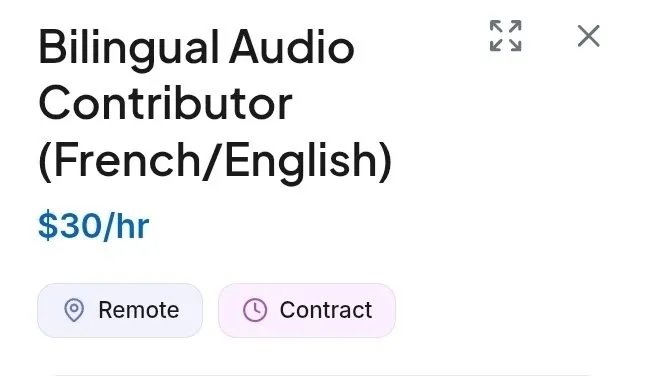
If you are French-English bilingual, AfterQuery pays $30 for reading French with your own French-accented English. Apply.
AfterQuery referral links (5)
Codes shared by AfterQuery users. Copy one and enter it when you sign up.
Earn $50–$100/hour, remote AI training roles. Apply for a suitable role, complete the assessment, and if your profile matches, move to the next step.
AfterQuery pays experts for project-based work. Apply through my link first and pick the role that fits your background.
Kepler pays more per approved task, there at AfterQuery. Kenyans can apply too.
If you are French-English bilingual, AfterQuery pays $30 for reading French with your own French-accented English. Apply.

Starting your side hustle on AfterQuery to earn. Referral Link:
Sorted by how many times each code has been copied.
Open a user-submitted AfterQuery referral link before starting an Experts application. The link automatically attaches the referrer; you do not enter a code. Applying is free, and expert pay depends on the role. Company referrals can pay up to $85K if AfterQuery buys the referred company's data.
What is AfterQuery?
AfterQuery is an applied research lab. It builds and sells datasets, benchmarks, and post-training work to AI labs and companies. It hires real experts to create and check that data through the AfterQuery Experts program.
Experts apply for project-based contract work. Roles include writing and reviewing coding tasks, checking medical, legal, finance, or science content, and recording voice samples in different languages. Each role has its own application, assessment, and pay rate. Work is remote and released as projects become available. Applying is free. AfterQuery also runs a Data Partnerships program. Companies can license their proprietary data for AI training and evaluation. Personal details are removed and an NDA is required.

Why sign up with a AfterQuery referral link
How the referral works
The code runs through AfterQuery's own referral program.
- 01Open one of the user referral links below before starting an AfterQuery Experts application; the link carries the referrer.
- 02Choose the role that fits your experience, review the terms, and complete the application and any assessment in that session.
- 03Companies may also refer businesses with proprietary data; AfterQuery says it pays up to $85K if it buys the referred company's data.
Referral bonus with a community code
Rewards unlock in order. Amounts can vary by country and campaign.
Use the link in 6 steps
Important rules and tips
- Open the link firstOpen the referral link before you create your account. If you apply from another page, the referrer may not be attached.
- Use only one linkApply through a single referral link so the referral goes to one person. Using more than one link can cause confusion.
- Acceptance is not workBeing accepted does not mean you get paid tasks right away. An X user reported on November 10, 2026 that most people sent to AfterQuery were marked as selected but had not yet earned anything.
- Use real credentialsApply with your real name and real credentials. Roles such as licensed physicians require proof of the license.
- Confirm rates and bonusesPay rates and referral bonuses in community posts are not guarantees. Check the rate on the role page and the referral terms in your account.
- Applying is freeDo not pay anyone to get you in. Applying is free, and referrers who offer paid help are not part of the official program.
Sign-up with and without a code
| AT SIGN-UP | NO CODE | WITH CODES |
|---|---|---|
| Referrer credited | Without referral link | With referral link |
| Expert pay range | About $30 to $160 per hour | About $30 to $160 per hour |
| Company referral payout | — | Up to $85K |
| Application review | Yes | ✓Yes |
| Guaranteed work | — | — |
| Cost | Free | Free |
Common questions
What is the AfterQuery referral link?
A referral link is a personal link that opens the AfterQuery Experts application with the referrer attached. When you apply through it, the person who shared the link can be credited as your referrer.
How do I use an AfterQuery referral link?
Open a referral link from the list above, then complete the application in that same session. The link is not a code you type in; it attaches the referral automatically.
Is there an AfterQuery promo code I can type in?
No. The referral is attached by opening a personal referral link before you apply, not by entering a code.
How much is the AfterQuery referral bonus?
For company referrals, AfterQuery says it will pay up to $85K if it buys the referred company's data. For expert referrals, any bonus is role specific and quoted only by community posters, so confirm the terms in your account.
Is AfterQuery free to join?
Yes. Applying to the AfterQuery Experts program is free.
Does AfterQuery guarantee work after I apply?
No. Projects are released as work becomes available, and some applicants wait for their first task. Being accepted does not mean you will be given paid work right away.
Why should I use a referral link instead of applying directly?
It costs nothing and the application is the same. It credits the person who introduced you, and posters often link directly to the exact role page.
What if my AfterQuery referral is not showing?
Check that you opened the referral link before you created your account and that you applied through that link. If it still does not appear, contact AfterQuery support and tell them who referred you.
Join AfterQuery through a referral link
Open a referral link from the list above and apply to the AfterQuery Experts program. Joining is free, and project work pays by the role.
More codes and links