
Amazon referral links
A Amazon referral link connects your new account to the user who shared it and unlocks the sign-up rewards: amazon Gift Card on approval (often $20) for an approved Prime Store Card or Amazon Store Card application.. Pick a code shared by the community below.

Get a $20 Amazon Gift Card for each friend approved for the Prime Store Card or Amazon Store Card, up to $100 per calendar year

Easy to get credit card, Amazon Store card with bonus sign up just in time for Black Friday and Thanksgiving sales!

Get an Amazon Gift Card instantly upon approval for Prime Store Card or Amazon Store Card. Here's my referral link, or scan my referral QR code.

My Amazon Referral Link
Amazon referral links (7)
Codes shared by Amazon users. Copy one and enter it when you sign up.
Get a $20 Amazon Gift Card for each friend approved for the Prime Store Card or Amazon Store Card, up to $100 per calendar year
Easy to get credit card, Amazon Store card with bonus sign up just in time for Black Friday and Thanksgiving sales!
Get an Amazon Gift Card instantly upon approval for Prime Store Card or Amazon Store Card. Here's my referral link, or scan my referral QR code.
My Amazon Referral Link

I'm a senior citizen who recommends the Amazon Prime Store card. It's easy to use. Works like a regular credit card. You earn rewards.

See if you qualify for an Amazon Prime Credit Card
Fastest credit approval and you get an Amazon Gift Card instantly upon approval for Prime Store Card or Amazon Store Card. Enjoy 5% cash back.
Sorted by how many times each code has been copied.
Use an Amazon referral link from the list to apply for the Prime Store Card or Amazon Store Card. If approved, you receive an Amazon Gift Card (often $20); confirm the current offer terms on the linked application page.
What is Amazon?
Amazon is an online store where millions of people buy everyday items, electronics, books, groceries, and gifts. Prime members get fast delivery, video, and member-only prices. Amazon also runs its own store cards for loyal shoppers.
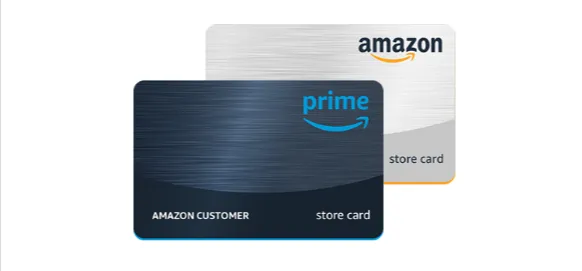
The Prime Store Card is for members with an eligible Prime membership. The Amazon Store Card is for other customers. Both cards work only for purchases on Amazon, and Synchrony Bank issues the card account. With an eligible Prime membership, the Prime Store Card earns 5% back on Amazon purchases. Cardholders also see limited-time card member deals during big sales. There is also an Amazon Prime Secured Card for people building credit. These store cards are separate from the Prime Visa, which is a different card from a different bank.

Why sign up with a Amazon referral link
How the referral works
The code runs through Amazon's own referral program.
- 01Pick any referral link from the user-shared list on this page.
- 02Sign in to the Amazon account where you want the card and the gift card to go.
- 03Open the referral link and read the current gift card offer and card terms on the official page.
- 04Apply for the Prime Store Card if you have an eligible Prime membership, or the Amazon Store Card if you do not.
- 05Enter your real name, address, income, and other details exactly as they appear on your records.
- 06Wait for the decision. Many applicants get one within moments.
- 07After approval, check your Amazon wallet for the gift card and your new card.
- 08Choose the store card at checkout on future orders so you earn your rewards.
Referral bonus with a community code
Rewards unlock in order. Amounts can vary by country and campaign.
Use the link in 5 steps
Important rules and tips
- Open the link before applyingOpen the referral link before you start the application. If you apply from the regular store card page first, you usually cannot add the invite bonus later.
- Sign in to the right accountSign in to the Amazon account you want the gift card attached to before you open the link. The gift card goes into the wallet of the account you apply from.
- New applicants onlyThe offer is for new applicants. If you already hold the Prime Store Card or Amazon Store Card, you do not qualify as the new applicant.
- Gift card after approvalAmazon adds the gift card when it approves your application. If the company declines your application or sends it for review, the gift card will not appear until you are approved.
- Use one referral linkPick one referral link, open it, and finish the application in that same session. Using more than one link can cause problems.
- Prime needed for 5% backThe Prime Store Card earns 5% back on Amazon purchases only with an eligible Prime membership. Without an active Prime membership, the card may not earn its 5% back.
Common questions
What is the Amazon referral link?
It is a personal link from someone who already has an Amazon store card. You open it and apply for the card. If Amazon approves you, you get an Amazon Gift Card.
How much is the Amazon referral bonus?
New applicants usually get a $20 Amazon Gift Card. The person who shared the link gets a $20 gift card for each approved friend, up to $100 a year.
Does the referral link work for the Prime Visa?
No. This link is for the Prime Store Card and the Amazon Store Card. The Prime Visa is a different card and has its own offer.
Do I need Prime to use a referral link?
No. But the Prime Store Card and its 5% rewards need an eligible Prime membership. Without Prime, you would apply for the Amazon Store Card.
Apply for the card with a referral link
Open a referral link before applying. If approved, you may receive an Amazon Gift Card (often $20); the referrer earns $20 per approved friend, up to $100 per calendar year.
More codes and links